Top ERP Systems for Mid-Sized Businesses in 2026: A Practical Comparison
Compare 12 ERP systems for mid-sized businesses in 2026, with pricing, best-fit use cases, and a practical buying framework.
 Admin
Admin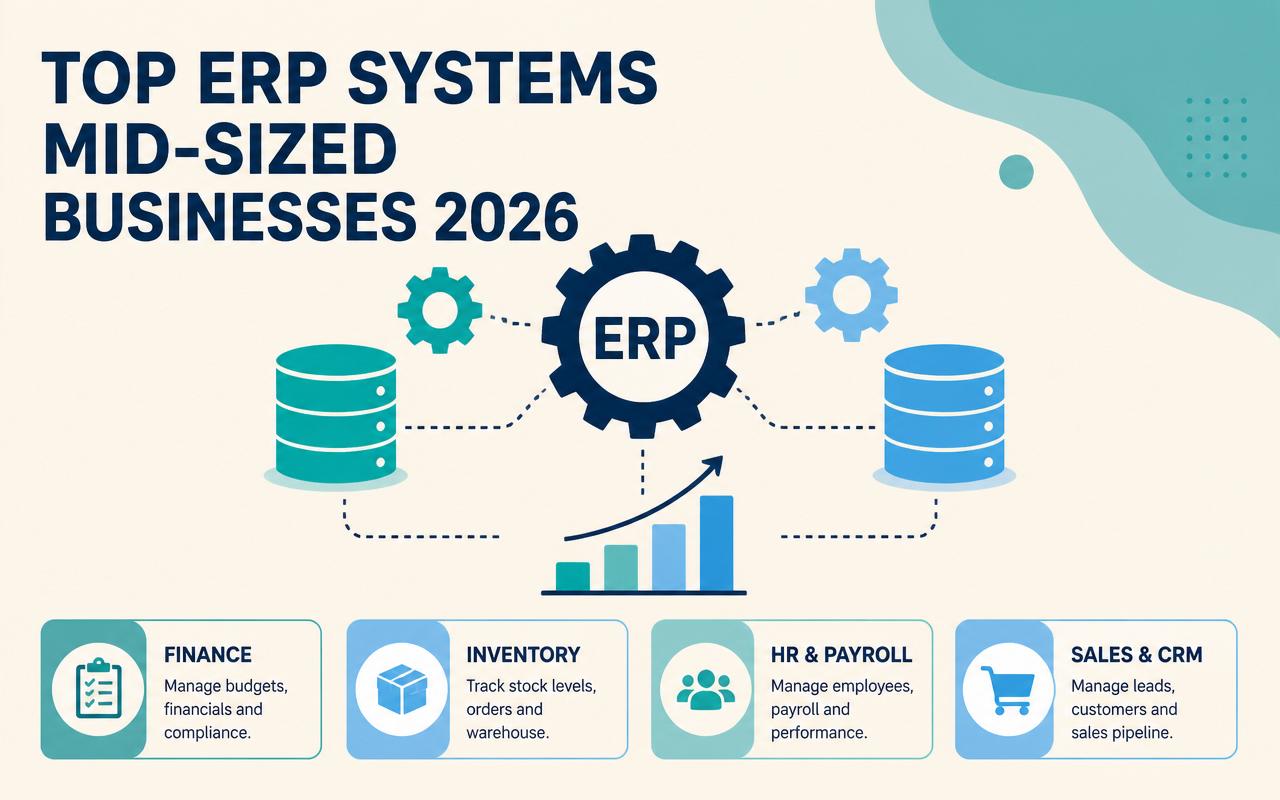
Mid-sized companies usually do not hit an ERP wall because they are failing; they hit it because the business outgrows the systems that used to work. Finance closes slow down, inventory counts disagree with what sales promised, and leadership starts relying on spreadsheet exports to answer basic questions. By 2026, that problem is sharper because customers expect tighter delivery windows, finance teams need cleaner audit trails, and operations teams are dealing with more channels, more SKUs, and more compliance. The right ERP is not just a back-office database. It is the system that keeps purchasing, fulfillment, accounting, and planning from drifting apart.
Why ERP systems for mid-sized businesses matters in 2026
For mid-sized operators, ERP selection is now a margin decision, not an IT exercise. The wrong stack adds manual work in every department, and the right one reduces rework without forcing a Fortune 500 implementation.
- Multi-channel operations need one source of truth for orders, inventory, and customer history.
- Finance teams are under pressure to close faster with cleaner intercompany, revenue, and project accounting workflows.
- Supply chain volatility makes basic planning tools less useful unless they connect directly to purchasing and demand signals.
- Remote and hybrid teams need browser-based workflows, approvals, and role-based access without VPN friction.
- Compliance demands are rising, especially for audit trails, permissions, tax handling, and data retention.
- Mid-sized firms want automation, but they still need systems that can be configured without a year of custom development.
The 10-12 ERP systems for mid-sized businesses to watch in 2026
NetSuite
NetSuite fits companies that have outgrown accounting software and need a single cloud platform for finance, inventory, order management, and multi-entity consolidation. It is especially attractive when leadership wants standardization across regions without stitching together separate products. The trade-off is that NetSuite tends to reward firms that are willing to adopt its process model rather than bend it heavily to legacy habits. For many mid-sized teams, that constraint is what keeps the system maintainable after go-live.
- Financials with multi-subsidiary and multi-currency support
- Order-to-cash and procure-to-pay workflows
- Inventory and warehouse management options
- Reporting and dashboards across entities
- SuiteApps ecosystem for extensions
Pricing: contact sales. Best fit: mid-sized companies with multiple entities, high transaction volume, or a need for standardized cloud finance and operations.
Microsoft Dynamics 365 Business Central
Business Central is often the practical choice for companies already living in Microsoft 365, Outlook, Power BI, and Teams. It feels less like a separate universe than some ERP suites, which matters when adoption is a concern. It works well for organizations that need solid core accounting, inventory, and light manufacturing or distribution workflows without jumping into a heavyweight suite. The biggest advantage is ecosystem fit; the biggest risk is underestimating how much partner quality affects the outcome.
- Core finance, sales, purchasing, and inventory
- Native connection points with Microsoft 365 and Power Platform
- Light manufacturing and assembly support
- Role-based dashboards and approvals
- Broad partner add-on ecosystem
Pricing: starts around $70/user/month (verify current pricing). Best fit: Microsoft-centric businesses that want a capable ERP with a familiar user experience and strong integration options.
SAP Business One
SAP Business One is a strong fit for smaller mid-market teams that need structure around finance, inventory, sales, and service but do not need the complexity of larger SAP environments. It is often chosen by wholesalers, light manufacturers, and product companies that want robust core controls and a long-established vendor ecosystem. The implementation usually succeeds when the company accepts standard business processes and uses a partner to localize what actually needs customization.
- General ledger, AP, AR, and fixed assets
- Inventory and purchasing controls
- Sales opportunity and service management
- Basic production and MRP capabilities
- Strong partner network for local deployment
Pricing: contact sales. Best fit: product-based businesses that want a mature ERP with global brand recognition and local implementation support.
Sage Intacct
Sage Intacct is especially strong where finance is the center of gravity and operational complexity is growing around it. It handles multi-entity accounting, dimensional reporting, and approval workflows well, which is why professional services, SaaS, and finance-led businesses often shortlist it. It is not the deepest choice for manufacturing or advanced warehouse operations, but for companies that care most about reporting accuracy and close speed, it can be a very clean fit.
- Dimensional general ledger and reporting
- Multi-entity and multi-currency consolidation
- Accounts payable automation options
- Project and subscription-friendly financial workflows
- Prebuilt integrations through ecosystem partners
Pricing: contact sales. Best fit: finance-led mid-sized firms, especially services, SaaS, and organizations that need strong reporting without heavy manufacturing requirements.
Acumatica
Acumatica appeals to operators who want cloud ERP flexibility without paying per named user in the same way many competitors do. That pricing model can matter for businesses with a mix of office users, warehouse staff, project managers, and occasional approvers. Acumatica also tends to show up in distribution, construction, manufacturing, and field service because it covers a broad set of operational workflows without feeling as rigid as some legacy systems.
- Distribution, manufacturing, construction, and field service editions
- Role-based access with browser-native workflows
- Project accounting and job costing
- Inventory, order management, and purchasing
- Consumption-based licensing model
Pricing: contact sales. Best fit: mid-sized companies that need broad operational coverage and want to avoid strict per-user license pressure.
Odoo
Odoo stands out for breadth and modularity. A company can start with accounting, CRM, inventory, or e-commerce, then add manufacturing, help desk, or field service modules as the business matures. That flexibility makes it attractive to firms that want a lower initial entry point and are comfortable managing a more configurable system. Odoo is often the right answer when the internal team can own some process design and does not need a highly prescriptive ERP implementation.
- Modular apps for finance, sales, inventory, and manufacturing
- Website, e-commerce, and CRM integration
- Open-source roots with a large customization community
- Workflow automation across apps
- Both cloud and self-hosting options
Pricing: starts around $31.10/user/month for the Standard online plan (verify current pricing). Best fit: cost-conscious mid-sized businesses that want modular ERP coverage and are prepared for some configuration work.
Epicor Kinetic
Epicor Kinetic is built for manufacturers that care about production detail, shop-floor visibility, and scheduling realities. It is usually stronger when the business has real routing, work-in-process, and planning complexity rather than simple assembly. The interface and deployment model have modernized, but the product still earns its place most often in operations-heavy companies where manufacturing execution details matter as much as finance. It is not usually the simplest system to adopt, but it can be the most relevant.
- Manufacturing execution and production planning
- MRP and inventory management
- Shop-floor visibility and quality workflows
- Supply chain and purchasing tools
- Industry-focused configuration options
Pricing: contact sales. Best fit: discrete manufacturers and operations-heavy businesses that need deeper production control than generic ERP packages provide.
Infor CloudSuite
Infor CloudSuite is worth attention when a mid-sized company operates in a vertical with specialized process requirements. Infor’s industry depth is the main reason companies look at it, especially in manufacturing, distribution, food and beverage, and other operationally specific segments. The decision usually comes down to fit: if your workflows are standard enough, a lighter ERP may be easier; if your industry has unusual constraints, Infor can reduce the amount of custom work needed to support them.
- Industry-specific cloud ERP suites
- Financials, supply chain, and operations coverage
- Embedded analytics and workflow support
- Manufacturing and distribution process depth
- Cloud deployment with vertical specialization
Pricing: contact sales. Best fit: mid-sized companies in industries that need more vertical-specific process support than a general ERP delivers.
SYSPRO
SYSPRO is a practical choice for manufacturers and distributors that want strong operational control without moving into an oversized enterprise suite. It is often evaluated by companies that care about lot traceability, inventory integrity, and production planning, but also want a system that can be tailored to their workflows. SYSPRO’s strength is discipline in the core supply chain and manufacturing processes rather than broad platform sprawl.
- Manufacturing and distribution functionality
- Inventory and warehouse controls
- Lot and serial traceability
- Production planning and shop-floor support
- Reporting and workflow tools
Pricing: contact sales. Best fit: product companies that want strong traceability and operational controls without adopting a very large enterprise platform.
Katana
Katana is not trying to be a full enterprise suite. It is a good fit for small to mid-sized product makers that need a clearer handle on inventory, production orders, and fulfillment, especially when they sell through Shopify or other commerce channels. The value is speed and usability. Teams that are intimidated by traditional ERP projects often adopt Katana because it is easier to get running, though companies with complex finance, multi-entity reporting, or heavy compliance needs usually outgrow it.
- Inventory and production planning for makers
- Shopify and commerce integrations
- Purchase and sales order management
- Real-time material and stock tracking
- Simple interface for small teams
Pricing: starts around $179/month (verify current pricing). Best fit: small to mid-sized manufacturers, makers, and product sellers that need production visibility more than deep enterprise finance.
Deltek
Deltek is one of the more relevant ERP options for project-driven businesses where utilization, billing accuracy, and contract controls matter more than warehouse complexity. That makes it useful for agencies, consulting firms, architecture and engineering, and government contractors. Its strength is connecting project accounting to the realities of labor, time, expenses, and billing rules. Companies choose Deltek when the question is not just 'what did we spend?' but 'did we bill everything we earned?'
- Project accounting and resource management
- Time and expense capture
- Billing and contract support
- Utilization and profitability reporting
- Industry-specific solutions for services and public sector
Pricing: contact sales. Best fit: project-based businesses and professional services firms that need tighter control over margins, staffing, and billing.
IFS Cloud
IFS Cloud is a strong contender for companies that span assets, service, projects, and complex operational work. It shows up in manufacturing, aerospace and defense, energy, and field service scenarios where asset lifecycle and maintenance are central. The reason it is on this list is not because it is the lightest option, but because some mid-sized firms have grown into exactly the kind of operational complexity IFS handles well. If service execution and asset uptime drive revenue, it deserves a look.
- Enterprise asset management
- Field service and work order management
- Manufacturing and supply chain capabilities
- Project and service lifecycle support
- Cloud deployment with industry depth
Pricing: contact sales. Best fit: mid-sized companies with assets, service operations, and manufacturing or project complexity that need one platform to coordinate them.
Comparison table
| Tool | Starting price | Best for | Standout feature |
|---|---|---|---|
| NetSuite | Contact sales | Multi-entity mid-market companies | Unified cloud finance and operations across subsidiaries |
| Microsoft Dynamics 365 Business Central | Starts around $70/user/month (verify current pricing) | Microsoft-centric small and mid-sized businesses | Strong Microsoft 365 and Power Platform integration |
| SAP Business One | Contact sales | Product companies needing mature core ERP | Longstanding partner ecosystem |
| Sage Intacct | Contact sales | Finance-led services and SaaS firms | Dimensional accounting and reporting |
| Acumatica | Contact sales | Distribution, construction, and manufacturing | Consumption-based licensing model |
| Odoo | Starts around $31.10/user/month (verify current pricing) | Cost-conscious teams wanting modular apps | Modular suite spanning CRM, ERP, and commerce |
| Epicor Kinetic | Contact sales | Discrete manufacturers | Deep production and shop-floor support |
How to choose the right ERP systems for mid-sized businesses
- Match the system to your real operating model. A finance-first company, a manufacturer, and a project-based agency do not need the same ERP strengths.
- Estimate total cost beyond license fees. Include implementation, partner services, integrations, training, data cleanup, and internal admin time.
- Check how many users actually need full licenses. Some vendors are cheaper on paper until you add warehouse, floor, or occasional approver access.
- Review integration needs early. E-commerce, payroll, CRM, shipping, EDI, BI, and banking connections often determine whether the system works day to day.
- Ask about support SLAs and partner quality. A strong vendor with a weak implementation partner can still produce a bad deployment.
- Consider data residency, compliance, and audit requirements if you operate across states or countries or handle regulated data.
Suggested stack by company size
Small business / low budget
Smaller teams usually need something that can replace spreadsheets without creating a six-month systems project. The best fit is often a modular or lighter ERP that covers finance, inventory, and basic order flow while leaving room to grow. Avoid buying for complexity you do not have yet; that is how small companies end up paying enterprise implementation costs for workflows they will not use.
- Odoo
- Katana
- Microsoft Dynamics 365 Business Central
Mid-market or agency
Mid-market firms usually need a balance of control and flexibility. They may have multiple locations, more than one entity, or project and product workflows running at the same time. This is the zone where finance, reporting, and integrations start to matter as much as basic transaction handling. The best systems here are the ones your team can keep clean after implementation.
- NetSuite
- Sage Intacct
- Acumatica
- Deltek
Enterprise
Once operations get more complex, the question changes from 'what can we afford?' to 'what can our business survive?' Enterprise-leaning mid-sized firms need stronger controls, industry depth, and better cross-functional visibility. The systems below are more demanding to implement, but they also handle complexity that lighter tools often push back into spreadsheets.
- IFS Cloud
- Infor CloudSuite
- Epicor Kinetic
- SAP Business One
Trends to watch in ERP systems for mid-sized businesses for 2026
- Agentic invoice coding that routes exceptions, requests missing backup, and drafts approvals before AP staff intervene.
- Automated close assistants that reconcile recurring entries, flag balance-sheet anomalies, and prepare a close checklist by entity.
- Role-specific copilots that answer policy and process questions inside finance, purchasing, and warehouse workflows instead of in a separate chat window.
- More usage-based pricing and mixed licensing models for warehouse, project, and seasonal users.
- Tighter native links to e-commerce, shipping, payroll, and BI tools so companies can reduce custom middleware.
- More attention to audit logging, permission design, and data residency as buyers face tougher compliance reviews.
I have seen more ERP projects fail from sloppy master data and weak role design than from the software itself. One client went live with duplicate item codes, over-permissive purchasing rights, and no agreed naming convention for locations, then spent the next quarter arguing about whose numbers were correct. The lesson was simple: clean the chart of accounts, item master, customer records, and approval matrix before configuration starts, and keep the process owner in the room when the implementation partner asks for a shortcut. The shortcut always comes back as rework.
FAQs
What is the best ERP for a mid-sized business in 2026?
There is no universal best pick. NetSuite, Business Central, Sage Intacct, and Acumatica are common shortlists, but the right choice depends on whether you are finance-led, Microsoft-centric, manufacturing-heavy, or project-based.
Should a mid-sized company choose cloud ERP or on-premise ERP?
Cloud ERP is the better default for most mid-sized businesses in 2026 because it reduces infrastructure burden and improves remote access. On-premise still shows up in some regulated or highly specialized environments, but it is less common for new deployments.
How long does an ERP implementation usually take?
Simple deployments can take a few months, while multi-entity, manufacturing, or heavily integrated projects can take much longer. The biggest driver is usually data cleanup and process design, not the software install itself.
What hidden costs should I budget for?
Expect implementation services, data migration, training, integration work, reporting buildout, and internal time for testing and change management. License fees are only one part of the total cost.
Which ERP is best for manufacturing?
Epicor Kinetic, SYSPRO, Infor CloudSuite, Acumatica, and SAP Business One are all worth evaluating depending on how complex your production environment is. Katana is better for smaller makers with simpler needs.
If you are narrowing the field, start by mapping your top ten processes and the reports you cannot live without. Then ask vendors to show those workflows live, using your terminology, your approval paths, and your sample data. That exercise will tell you more than a polished demo deck. From there, build a short list of two or three systems and run a scoped implementation plan that includes integrations, data cleanup, and user training. The best ERP choice is the one your team can actually operate six months after go-live. If you need to move fast, schedule demos with your finance lead, operations lead, and implementation partner in the same room.
Pricing sources
All prices cited in this article are taken from each vendor's official pricing page. Vendors update pricing frequently — always confirm the current rate with the source before purchasing.
Related articles
Inventory Management Software for Small Retailers in 2026
Practical 2026 guide to inventory management software for small retailers, with tool comparisons, selection criteria, and stack recommendations.
Admin
Best POS Systems for Restaurants and Retail Stores in 2026
Compare the best POS systems for restaurants and retail in 2026, with pricing, features, buyer fit, and practical selection guidance.
Admin
Digital Signage Software for Retail and Hospitality in 2026
Compare 2026 digital signage software for retail and hospitality, with pricing, features, use cases, and a practical buying framework.
Admin